
How tap-to-order works, from setup to first order.
How tap-to-order works: guests tap an NFC display or scan the QR code, order from their own phone with no app, and the ticket lands on the kitchen display in your staff portal. Getting there takes one onboarding call, an in-person install and staff training, included on every plan for NYC venues.
Or book a 15-minute call. Plans from $297 a month, no commission.
How does tap-to-order work for guests?
Tap or scan
Every printed table display carries an NFC tag and a QR code. Guests tap their phone on it or scan the code.
Order in the browser
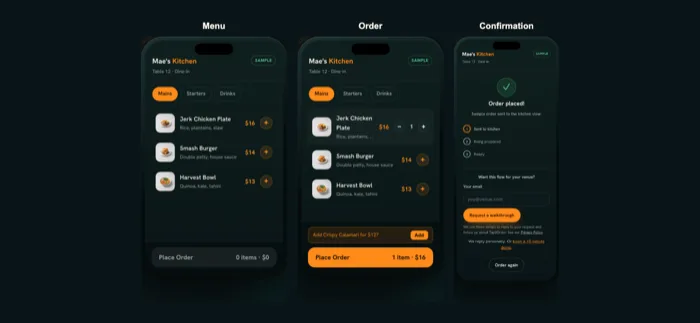
Your menu opens in the phone browser. No app, no guest account. They customize and order when they're ready.
The order reaches your team
It arrives instantly in the live kitchen and bar view. Your team makes it and serves it as usual.
The second round at the bar, one more plate, a refill at the counter: guests order on their own timing and staff stay with the room. Try it in the interactive demo, which uses a sample venue and sample orders.
What happens after you sign up?

Buy online or book a call
Pick a plan on the pricing page or book 15 minutes. Online buyers also get priority install scheduling and 2026 pricing locked for 12 months.
Onboarding call
We learn your menu, tables, service style and where each order is handed off.
We build it
Your ordering site and staff portal, plus a designer-made table display and poster you keep.
In-person install and training
A uniformed Tap2Order team member programs and places your NFC and QR displays, demos the system and trains your staff on the portal.
Live within 7 days of your onboarding call, once we have your menu and venue details. If we miss it, your next month is free. The clock starts at the onboarding call, not at purchase, and the guarantee covers NYC venues. See tap-to-order in NYC for the five boroughs, or get in touch about a venue elsewhere.
What does your venue need to provide?
- Your menu, with prices, the choices guests can make and what sells out.
- Your table count: tables, bar seats and counter spots that need a display.
- Your logo, for the table display and poster.
- Your payment processor. Guest card payments run through it at its standard rates; we set it up together during onboarding.
- A device you already own. Any desktop, laptop, tablet or phone runs the staff portal. No hardware to buy.
- A short training slot with the people on shift: a server, a bartender or counter lead, and someone from the kitchen.
Patio or second room? An extra pack of 10 programmed displays is $149 one-time.
What do staff and owners see?
The staff portal is a progressive web app: it opens like an app on the tablet by the pass, the laptop behind the bar or a manager's phone, with nothing to install and no terminal to lease.
- Every order the moment it's placed, on a live kitchen and bar display with a new-order chime.
- Control in the rush: pause ordering, or mark an item sold out in one tap.
- What's selling, from anywhere: owners check live sales, busy periods and top sellers from home.
Growth Engine adds the tools to sell more and waste less, including upsells, stock that counts itself and the Algorithm, which paces the kitchen so each table's food lands together. Pro Command runs up to 5 locations on numbers: forecast, food cost and labor. Everything is on the staff portal and features page; the guide for staff covers the handoff on shift.

What does it cost to get started?
Essential Core is $297 a month, Growth Engine $597 and Pro Command $997, with no per-order commission. Setup, install and training are included, and the $599 setup fee is waived for every customer who signs by December 31, 2026. Prepay annually and get 2 months free. For 6 or more locations or a franchise, Group HQ is custom: book a call. The AI phone ordering add-on, which answers the calls your team can't pick up, is $149 a month on any plan.
How it works: common questions
What if a guest's phone doesn't tap?
Every display also carries a QR code, so the guest scans it with the camera and reaches the same menu.
Do I need to buy tablets, terminals or a new POS?
No. No terminals to buy, no tablets to lease and no POS replacement. The staff portal runs on devices you already own, and the printed displays are included.
What do I need to send you?
Your menu, your table count and your logo. We cover service style and order handoff on the onboarding call.
Is there a contract?
Plans are billed monthly with a 3-month first term that renews quarter to quarter. Cancel with 30 days' notice before the end of a quarter, with no fee after the first quarter. The setup fee is waived, not deleted: cancel in the first quarter and the $599 becomes payable with that quarter's remaining monthly fees.
See the flow for your kind of venue
See the guest flow for yourself.
Place a sample order and watch it reach the kitchen view.